
Call us free on 0800 122 3003 or Contact Us here

how to

French tutors – personalise your flyers in minutes!

Check out our new French tutor designs at flyerzone.co.uk! At Flyerzone, we've got some fantastic fresh French tutor designs ready for the New Year. Follow these 3 easy steps to have your flyers looking great and ready for printing in minutes: 1. Select your favourite from thousands of individually crafted French tutors designs. These have been put together by real designers with French teachers just like y ...

Read more

Get lawyers’ flyers fast and easily!

3 Easy Steps to Personalised Lawyers' Flyers with Flyerzone.co.uk: 1. Select your favourite from thousands of individually crafted here. The Right Design for You Each of our lawyers' designs feature carefully crafted text specific to your industry. However, nobody knows your business better than you so make sure you personalise the design to your business to make it work best for you. Think carefully about ...

Read more

Personalise your electrician flyers in minutes!

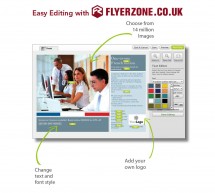
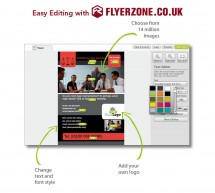
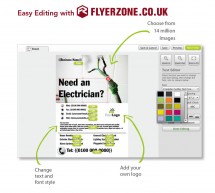
3 Easy Steps to Personalised Electrician Flyers with Flyerzone.co.uk: 1. Select your favourite from thousands of individually crafted Electrician designs. These have been put together by real designers with independent electrical engineers just like you in mind. 2. Use our editor to easily change fonts, colours, images, and add your own logo if you have one. 3. Choose from a wide range of sizes and finishes ...

Read more

How to change a design for a different industry

All of our designs are fully editable which means that they can be completely tailored to your needs. You can therefore select a design intended for one industry and change the text and images to make it work for a completely different industry. Remember everything marked with a pink 'Edit' button in the editor can be changed so try to bear in mind the following things when you are browsing designs: Colours ...

Read more

How to design a flyer online

If you are looking to design a flyer then you can browse our design library at Flyerzone.co.uk by product or use the search box in the top right hand corner to type in an industry. You can filter the results of your search using the side menus on the left side of the page to remove certain products, industries or design styles. When you have selected your design and you are viewing it on the preview page th ...

Read more

How to upload your own logo or image when designing online

To make a design a personal to your business as possible, upload you own images and logos. If an image can be changed, you'll see a pink "Edit" button in the middle of it. Click the button on the image you want to change and this will bring up our Image Editor. Click the "Replace" button. If there are any suitable images already in your Files & Images folder, you'll see them here. Just click one and cli ...

Read more

How to delete elements when designing online

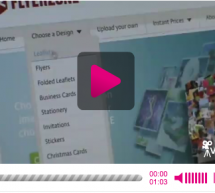
We've made sure that all our designs can fit the most common contact details that you might need. However, if you don't want a particular item, like a fax number or website address, you can delete it from your design so that it won't be printed. To do this, just select the text and press 'delete'or 'backspace' to remove it from your design. To see an onscreen demonstration of this, watch this video for more ...

Read more

How to save your designs when designing online

If you aren't ready to place an order but don't want to lose your design, make sure you save it before leaving the website. To do this,  just press the 'Save' button in the top right corner. You'll need to register or "Sign in" before editing for this to work. Next time you visit, "Sign in" to your account and you'll see your saved designs on your Dashboard. Just choose the one you want to work on and you c ...

Read more

How to change text size when designing online

If you want to increase or shrink the text in one of our Flyerzone designs, click the pink "Edit" button on the text you want to change. This will open our Text Editor to the side of your text box. Simply select the item of text you want to change, then pick a new size from the "Size" drop down menu. You can watch a video demonstration of how to do this here. ...

Read more

How to edit the reverse on a double sided design

When editing a Flyerzone design with 2 pages or a reverse, just click on the "Reverse" tab at the top of the page. Click on the "Front" tab to return to the front page. Make sure you check both sides are fully edited and complete before sending your design to print. To see an online demonstration of this, watch this video for more information. ...

Read more

© Copyright Flyerzone 2012

Scroll to top